
.png?width=4000&height=2250&name=Copy%20of%20one%20hour%20(4).png)

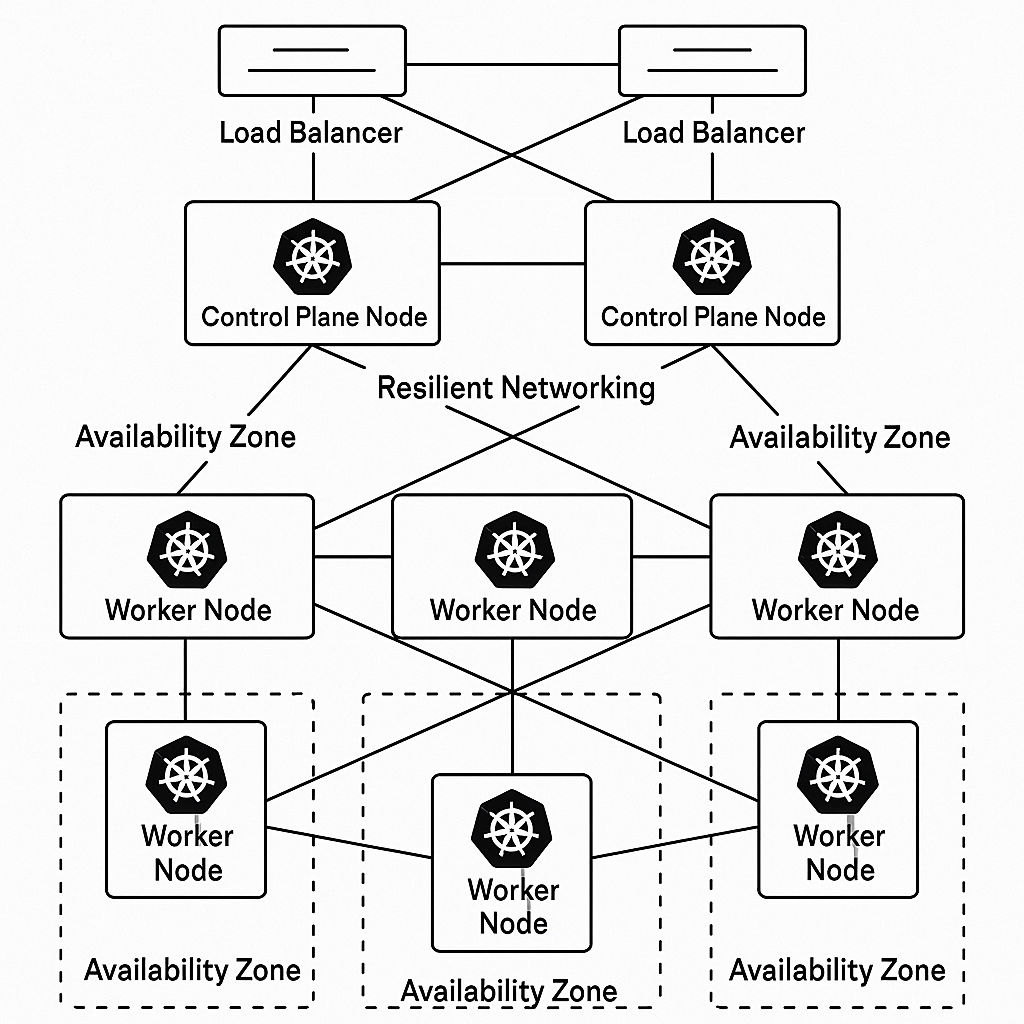
Master the architecture and implementation strategies that transform fragile Kubernetes deployments into resilient, production-ready clusters capable of withstanding failures while maintaining zero downtime.
Understanding High Availability Architecture for Kubernetes Clusters
High availability in Kubernetes represents more than just keeping your applications running—it's about building resilient systems that gracefully handle failures while maintaining service continuity. A production-grade HA architecture eliminates single points of failure across every layer of your cluster, from the control plane to worker nodes and networking infrastructure. This foundation ensures that your deployments can withstand component failures, network partitions, and infrastructure outages without impacting end users.
The core principle of Kubernetes HA design centers on redundancy and distribution. Your control plane components—the API server, etcd, scheduler, and controller manager—must be replicated across multiple nodes, preferably in different availability zones. This distributed architecture means that if one control plane node fails, the remaining nodes seamlessly handle cluster operations without downtime. Similarly, your etcd cluster requires an odd number of members (typically three or five) to maintain quorum and consensus during failures.
Understanding the trade-offs between complexity and resilience helps you make informed architectural decisions for your homelab or production environment. While a single-node cluster works for learning and development, production workloads demand multi-node control planes with load balancing, automated failover mechanisms, and persistent storage that survives node failures. By grasping these architectural fundamentals, you build the foundation for clusters that mirror enterprise-grade deployments—exactly the kind of real-world experience that distinguishes job-ready DevOps professionals from those who only completed tutorials.
Building Resilient Control Plane Components for Zero Downtime
The control plane serves as the brain of your Kubernetes cluster, and its resilience directly determines your cluster's ability to maintain operations during failures. Building a resilient control plane starts with deploying multiple API server instances behind a load balancer, ensuring that kubectl commands and application deployments continue functioning even when individual API servers become unavailable. Each API server operates independently, handling requests and updating cluster state in etcd, which means your cluster can lose API server nodes without losing functionality.
Your etcd cluster requires special attention since it stores all cluster state and configuration data. Deploy etcd as a dedicated cluster with at least three members distributed across different failure domains—separate physical hosts or availability zones. Configure etcd with proper backup strategies using snapshots at regular intervals, and ensure you can restore from these snapshots quickly. Etcd's raft consensus algorithm requires a majority of members to be healthy, so a three-member cluster can tolerate one failure, while a five-member cluster can handle two failures while maintaining quorum.
The scheduler and controller manager components also need configuration for high availability, but they operate differently than the API server. These components use leader election, meaning only one instance actively makes decisions at any time while others remain on standby. When the active instance fails, another automatically takes over within seconds. This design prevents split-brain scenarios where multiple schedulers might assign the same pod to different nodes. Configure these components with appropriate lease durations and retry intervals to balance between quick failover and stability during temporary network issues.
Implementing these resilient control plane patterns in your homelab environment provides hands-on experience with the same architectural decisions you'll face in production roles. You'll understand not just how to deploy these components, but why each design choice matters, how failures propagate through the system, and what monitoring signals indicate impending problems—knowledge that translates directly into confidence during technical interviews and real-world incident response.
Implementing Multi-Zone Worker Node Strategies for Fault Tolerance
Worker nodes host your actual application workloads, and distributing them across multiple availability zones protects against zone-level failures that could otherwise take down your entire application. A well-designed multi-zone strategy ensures that your deployments spread replicas across zones, so a failure in one zone leaves your application running in the others. This distribution requires both proper node labeling and pod topology spread constraints that guide the scheduler to place pods intelligently across your infrastructure.
Start by labeling your worker nodes with topology keys that identify their zone, region, and other failure domains. Kubernetes provides standard labels like topology.kubernetes.io/zone that major cloud providers automatically apply, but in homelab environments, you'll manually apply these labels to simulate zone distribution. Use node selectors, node affinity rules, and anti-affinity constraints to ensure that replica sets, deployments, and stateful sets distribute their pods across different zones. This prevents scenarios where all replicas of a critical service run on nodes in a single zone that experiences an outage.
Pod topology spread constraints offer fine-grained control over how pods distribute across failure domains. These constraints allow you to specify maximum skew values that limit how unevenly pods can spread across zones, ensuring balanced distribution rather than having most replicas in one zone and few in others. Combined with pod disruption budgets, which prevent too many pods from being terminated simultaneously during maintenance or failures, you create a system that maintains availability even during rolling updates or node draining operations.
Your homelab provides the perfect environment to practice these strategies by simulating zone failures and observing how your applications respond. Shut down nodes in one zone and verify that traffic automatically redirects to replicas in other zones, or perform rolling updates and confirm that your pod disruption budgets prevent service interruptions. This hands-on experimentation builds intuition about fault tolerance that you can't gain from reading documentation alone—it's the kind of production-grade experience that helps you stand out when interviewing for DevOps and SRE positions.
Configuring Load Balancers and Network Redundancy for Production Traffic
Load balancers serve as the entry point for traffic into your Kubernetes cluster, and their configuration directly impacts your cluster's availability and performance. For production-grade deployments, you need load balancers at multiple levels: external load balancers that route internet traffic to your cluster, internal load balancers for the API server, and service-level load balancing through Kubernetes Services and ingress controllers. Each layer requires careful configuration to eliminate single points of failure and ensure seamless failover.
The API server load balancer represents a critical component that all cluster operations depend on—kubectl commands, kubelet updates, and controller operations all flow through this endpoint. Deploy your API server load balancer with redundancy, using either cloud provider load balancers with built-in HA or self-managed solutions like HAProxy or NGINX with keepalived for virtual IP failover. Configure health checks that accurately detect API server availability, and set appropriate timeout values that balance between quick failover and avoiding false positives during temporary slow responses.
For application traffic, Kubernetes Services provide built-in load balancing across pod replicas, but you'll typically want an ingress controller for HTTP/HTTPS traffic routing. Deploy ingress controllers like NGINX Ingress, Traefik, or Istio as DaemonSets or highly available deployments that run on multiple nodes across zones. Configure your ingress resources with appropriate backend health checks, connection timeouts, and retry policies that match your application's characteristics. Consider implementing service mesh technologies for advanced traffic management features like circuit breaking, retries, and traffic splitting.
Network redundancy extends beyond load balancers to include DNS configuration, multiple network paths, and proper network policy implementation. Configure DNS with low TTL values for quicker failover, implement network policies that allow necessary traffic while blocking potential attack vectors, and ensure your CNI plugin supports network redundancy features. Testing these network configurations under failure conditions in your homelab environment—simulating network partitions, DNS failures, and load balancer issues—builds the troubleshooting skills that separate junior engineers from experienced practitioners who can confidently handle production incidents.
Testing and Validating Cluster Resilience Through Chaos Engineering
Building a resilient cluster means nothing if you haven't validated that it actually survives failures as designed. Chaos engineering provides a disciplined approach to testing resilience by deliberately injecting failures into your system and observing how it responds. This proactive testing methodology, pioneered by companies like Netflix, helps you discover weaknesses before they cause production outages. For Kubernetes clusters, chaos engineering validates that your HA architecture, redundancy strategies, and failover mechanisms work as intended under real failure conditions.
Start your chaos experiments with simple, controlled scenarios that test individual components. Terminate random pods to verify that your replica sets automatically recreate them and that services seamlessly route traffic to remaining healthy pods. Drain nodes to simulate maintenance windows and confirm that pod disruption budgets prevent service degradation. Introduce network latency or packet loss between nodes to test how your applications handle degraded connectivity. These foundational experiments build confidence that your basic Kubernetes primitives function correctly before moving to more complex failure scenarios.
Advanced chaos engineering involves compound failures that more accurately reflect real-world incidents—multiple nodes failing simultaneously, entire availability zones becoming unreachable, or storage systems becoming temporarily unavailable. Tools like Chaos Mesh, Litmus Chaos, and Gremlin provide Kubernetes-native ways to inject these failures through custom resources and operators. Create chaos experiments that test your control plane's ability to maintain operations when etcd members fail, validate that your monitoring and alerting systems detect and escalate failures appropriately, and verify that your disaster recovery procedures actually work when you need them.
Documenting your chaos experiments and their results transforms testing into learning and proves your expertise to potential employers. Record what failures you injected, what you expected to happen, what actually occurred, and what improvements you implemented based on the results. This documentation becomes powerful portfolio material that demonstrates your ability to think critically about system reliability, design robust architectures, and validate those designs through systematic testing. When you walk into interviews prepared to discuss specific chaos experiments you've run and the insights they revealed, you demonstrate a level of hands-on production experience that most candidates lack—exactly the kind of real-world knowledge that leads to job offers.